Account and billing
Switch between businesses
In this article
One BizBaby sign-in can run several businesses. Click the arrow next to your business name at the top of the page and pick another one. You don't sign out, and everything you see changes to that business: its customers, jobs, team, settings, plan and bill.
Switch from the top of the page
- Click the small arrow to the right of your business name and plan at the top left.
- Click the business you want. Each one shows your role in it in brackets, such as (admin).
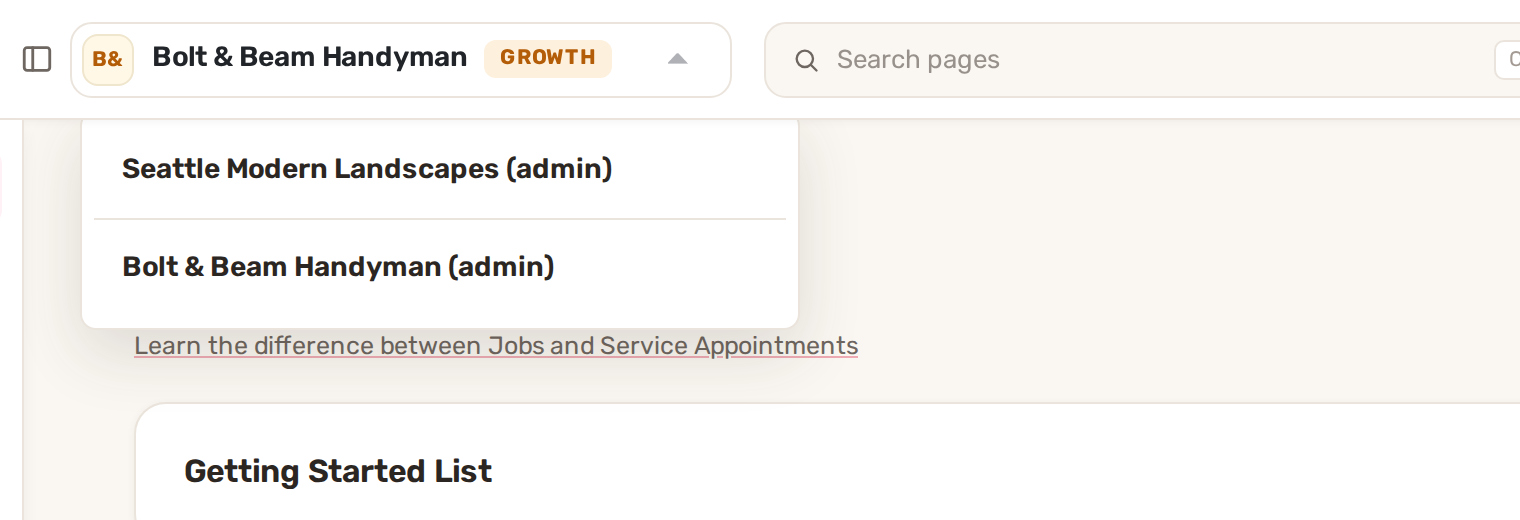
The arrow appears only when you belong to more than one business. A business you've been switched off in is greyed out and marked Disabled.
Other ways to switch
- Your menu: click your initials at the top right, then Switch company. Pick the business under Name and click Select.
- Business Information: click the gear icon, then Business Information. In the Organization card, pick a business and click Select. The button stays off until you pick a different business.
- On a phone: open the menu and tap Switch Company.
Add another business
On Business Information, in the Organization card, click Create new organization and fill in the new business's details. It gets its own customers, team, settings, plan and bill, and appears in your business menu.
Plans and bills for each business
Each business has its own plan, payment method and payment history on Billing & Plan. Switch to the business first, then open its billing. In the Organization card and on the Switch company page, your main business is marked (Primary). Only the primary business can cancel the membership.
Common problems
- There's no arrow next to my business name. You belong to one business only, or you're on a phone, where the switch is in the menu.
- "Access paused for billing". A payment for that business didn't go through, so team access above the plan's included user is paused. Nothing has been deleted. The owner can restore it from Billing & Plan.
- "No active access". Every business you belong to has switched your account off. Ask the business owner to turn you back on.
- I see the wrong customers or jobs. Check the business name at the top of the page. You're probably in another business. Switch back.
Related
- Add your team and permissions
- Change plan, cancel, payment method and invoices
- Two-step sign-in and account security
Was this article useful?
Keep reading
More Account and billing
Change plan, cancel, payment method and invoices
Your Billing & Plan page Only people who can open your business settings see this page. It shows your Current plan and i...
Read guide →Plans and what each includes
See the plans and your current one Click the gear icon at the top right, then Billing & Plan. Click Change plan. The pla...
Read guide →Two-step sign-in and account security
Verify your phone The first time you sign in, BizBaby shows Phone verification: "To keep your account safe, we need to v...
Read guide →Knowing what to charge is step one
First 3 months free. No card required. Bring the whole team.
Start Free Trial Back to Login