Marketing
Apply a promo code to your BizBaby plan
In this article
The short answer
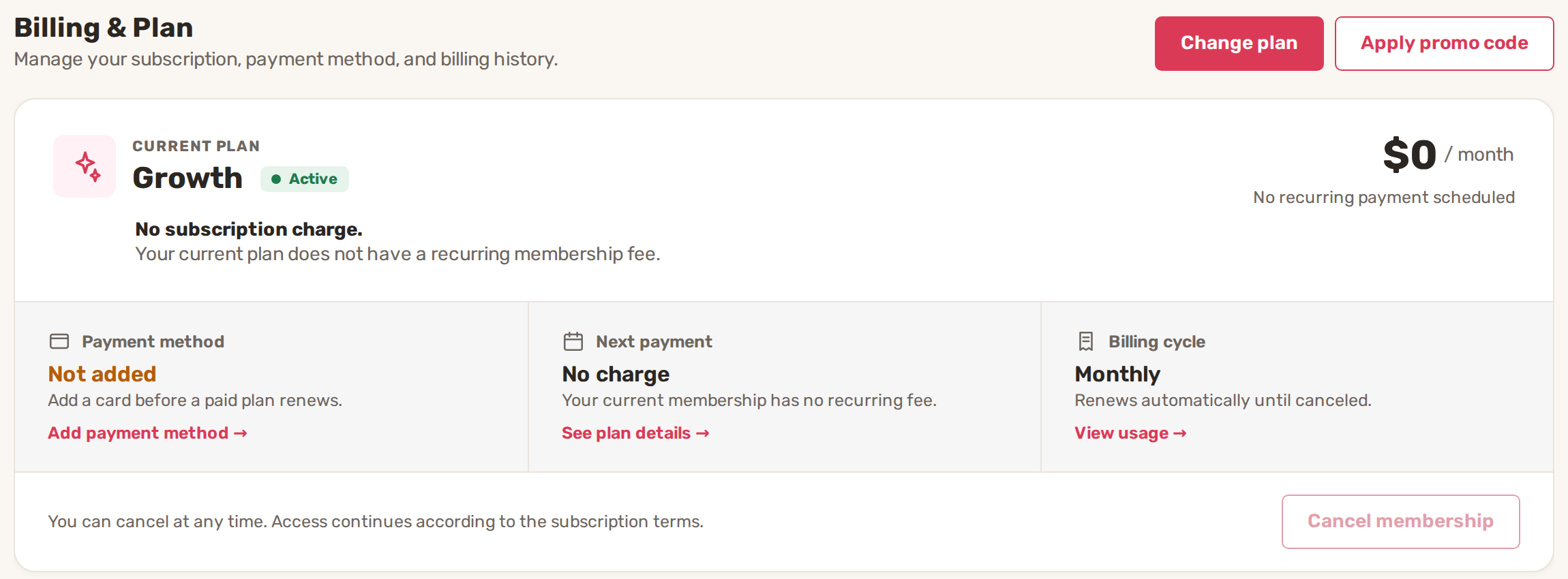
A promo code from BizBaby lowers or removes what you pay for your BizBaby plan, or adds credit to your account. Enter it on gear icon → Billing & Plan → Apply promo code. Each code works once per business.
Apply a code
- Click the gear icon at the top right, then the Billing & Plan tab.
- Click Apply promo code next to Change plan. The Apply Promo Code page opens.
- Type the code in Promo Code exactly as you received it.
- Click Apply Code. When it works, the page says Promo code successfully applied.
You can also type a code in the Promo Code field when you sign up for BizBaby.
What a code can do
| Code | What you get |
|---|---|
| Free month | Your next plan bill is free. |
| Free plan | Your plan is free from now on. |
| Discount | Your plan price drops by the code's percentage. |
| Credit | An amount is added to your account credit. Your plan stays as it is. |
Check Billing & Plan after applying a code to see your new price and next payment.
Common problems
- "Enter a promo code." The field is empty. Type the code first.
- "Code not found." (with "Oops! Code didn't match!" under the field). The code is mistyped, or it has expired or been switched off. Check capital letters and dashes.
- "Promo code already used". This business has used that code before.
- "The promo code could not be checked. Please try again." The check didn't reach BizBaby. Reload the page and try again.
Related
- Plans and what each includes
- Change plan, cancel, payment method and invoices
- Email campaigns: build, send, results
Was this article useful?
Keep reading
More Marketing
Email campaigns: build, send, results
Before you start Your plan includes email marketing. It's part of the Growth plan. See Plans and what each includes. You...
Read guide →Send marketing email from your own domain
Why campaigns need your own domain Until your own domain is connected and verified, clicking New Campaign on the Marketi...
Read guide →Knowing what to charge is step one
First 3 months free. No card required. Bring the whole team.
Start Free Trial Back to Login