Account and billing
Usage charges and your monthly bill
In this article
Your plan has a fixed monthly price. On top of it, BizBaby charges for what you use: calls, texts, emails, Agent Genie, Website Builder AI and storage over your allowance. These usage charges add up and are billed to your card each time they reach $20, as a separate usage invoice. Extra website pages and extra users go on your monthly plan bill instead. The Usage page shows every charge as it happens.
Open the Usage page
- Click the gear icon at the top right, then Usage. You can also click View usage on Billing & Plan.
- Pick a month in Showing at the top right. Every table on the page follows it.
What each section counts
The page has one card for each kind of usage, which BizBaby calls a meter.
| Meter | What it counts |
|---|---|
| Communications | Calls from your business number, SMS segments, MMS, email sends and marketing sends, day by day, with the cost of each day. |
| Agent Genie | Reply threads (texts, chat and customer email the AI answered) and calls it answered that would have gone to voicemail. The charge is fixed when the AI is used. |
| Wingman AI | Your questions to Wingman. Free during Beta. |
| Website Builder AI | Text and image generations after your website was delivered. |
| Website pages | Active pages against the number your plan includes, and extra pages at your plan's page rate. Counted every night and charged per day. |
| Storage | Photos, documents and attachments against your plan's allowance. Measured every night. |
Rates depend on your plan. See What costs extra on each plan. A text is billed per segment, roughly 160 characters, so a long text can cost two or three segments.
Read the summary
Near the bottom, Summary puts all the meters together for the month.
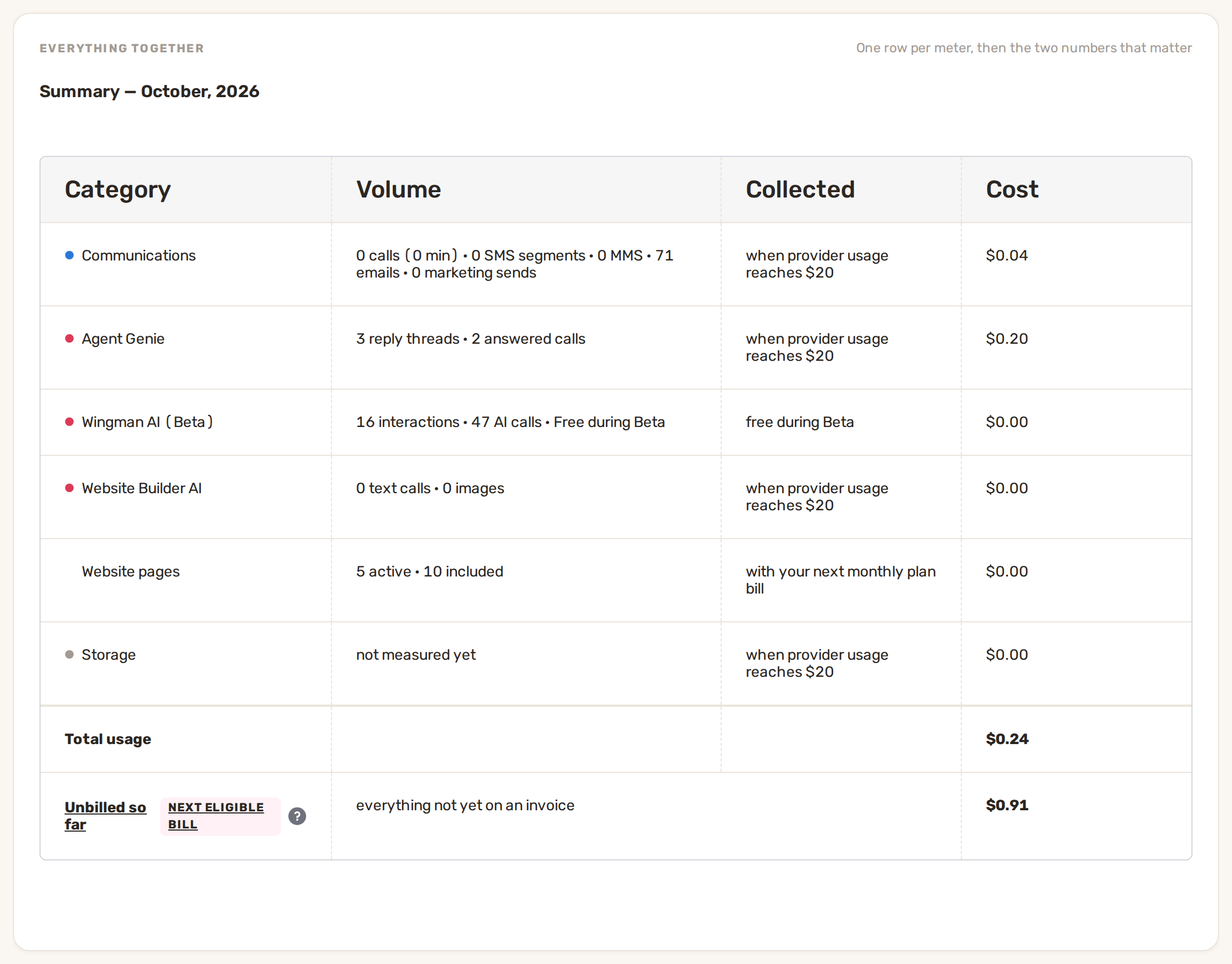
- Collected says how each row is billed: when provider usage reaches $20, with your next monthly plan bill, or free during Beta.
- Total usage is what this month's usage cost.
- Unbilled so far is everything not yet on an invoice, from any month. It goes on your next eligible bill.
How you're billed
| Charge | When it's billed |
|---|---|
| Your plan | Monthly, on your billing date. Free during your included 90 days. |
| Extra users, extra website pages | With your monthly plan bill. |
| Calls, texts, emails, AI, storage | Each time the unbilled total reaches $20, as its own Usage invoice. |
| Card and bank payments from customers | Taken from each payment. See Payouts and fees. |
Under the summary, Monthly bill shows what was actually charged that month: the plan payment and each usage invoice with its breakdown, then any credit and the total. Each usage invoice has a link to open it and to download it as a PDF. The same invoices are listed under Payment history on Billing & Plan.
Keep your costs down
- Texts: keep automated texts short so they fit in one segment.
- Agent Genie: its AI use stays under a monthly spending cap you control. See Agent Genie.
- Storage: on the Storage card, click Free up space. BizBaby suggests unused files only. Nothing is deleted without your confirmation, and anything removed can be restored for 30 days.
- Website pages: only active pages above your plan's allowance are charged.
Common problems
- A usage bill failed. New usage stays paused until the bill is paid. Click Pay now next to it, or update your card first. See Add or change your card.
- Monthly bill says "No charges this month". Your usage hasn't reached $20 yet, so it's still in Unbilled so far.
- Storage says "No measurements for this month". Storage is measured every night. Check again tomorrow.
- A month I expected isn't in the list. Showing starts from the month your business was created.
Related
- Plans and what each includes
- Change plan, cancel, payment method and invoices
- Messaging limits and delivery problems
Was this article useful?
Keep reading
More Account and billing
Change plan, cancel, payment method and invoices
Your Billing & Plan page Only people who can open your business settings see this page. It shows your Current plan and i...
Read guide →Plans and what each includes
See the plans and your current one Click the gear icon at the top right, then Billing & Plan. Click Change plan. The pla...
Read guide →Two-step sign-in and account security
Verify your phone The first time you sign in, BizBaby shows Phone verification: "To keep your account safe, we need to v...
Read guide →Knowing what to charge is step one
First 3 months free. No card required. Bring the whole team.
Start Free Trial Back to Login