AI
AI Receptionist: set it up, what it says, when it hands over
In this article
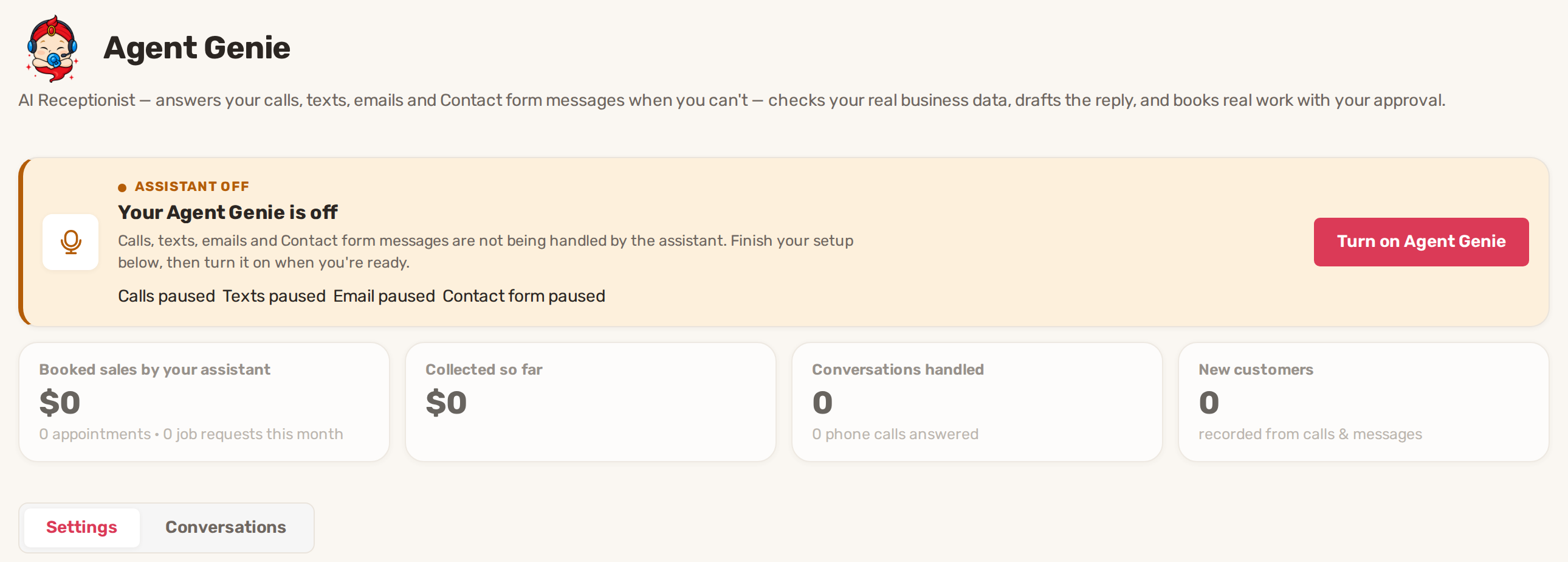
BizBaby's AI Receptionist is called Agent Genie. It answers your texts, emails, website Contact form messages, customer portal chat and, if you switch it on, the calls nobody picks up. It works from your real business data: your services, calendar, working hours and the customer's own records. By default every action it wants to take, such as booking an appointment, waits for your OK. Set it up on the Agent Genie page, then click Turn on Agent Genie.
Before you start
- Add a card on file. Agent Genie is billed by use, so it can't be turned on without one.
- Set your working hours and services. Agent Genie only offers times your calendar offers and quotes prices from your services.
- For texts, register your business number for texting (A2P 10DLC).
1. Open the Agent Genie page
Click Agent Genie in the menu on the left. If it shows a lock, your plan doesn't include it. If it isn't there at all, your role has no access to business settings. The card at the top says whether it's on, and which channels it covers: Calls, Texts, Email and Contact form. You can fill in every setting while it's off. Nothing reaches customers until you turn it on.
2. Tell it about your business
On the Settings tab, scroll to Personality, voice & abilities. Fill in the fields, then click Save.
| Field | What to put there |
|---|---|
| Extra instructions | Your assistant's extra instructions: tone and anything it should always mention, such as a seasonal special. Up to 2,000 characters. BizBaby's safety rules always apply on top. |
| Business facts | What your assistant should know about your business: facts it may share, such as locations, service area, parking, policies and history. Up to 2,000 characters. |
| Phone greeting | The first thing callers hear, up to 300 characters. Left empty, it says "Thanks for calling", your business name, and that the caller has reached your automated assistant. A caller whose number matches a customer is greeted by first name. |
| Voice | Assistant's voice on calls: Natural or one of the premium voices: Soft, Clear, Deep or Calm. Every voice costs the same. A new voice applies from the next call. |
| Spending cap | Monthly Agent Genie spending cap, $20 to start. When this month's AI replies and calls reach it, new ones stop until next month. |
| Languages | Speak other languages on request. When it's on and a caller asks for Spanish, French, German, Italian, Russian or Hindi, it offers to switch and carries on in that language. Off means English only. |
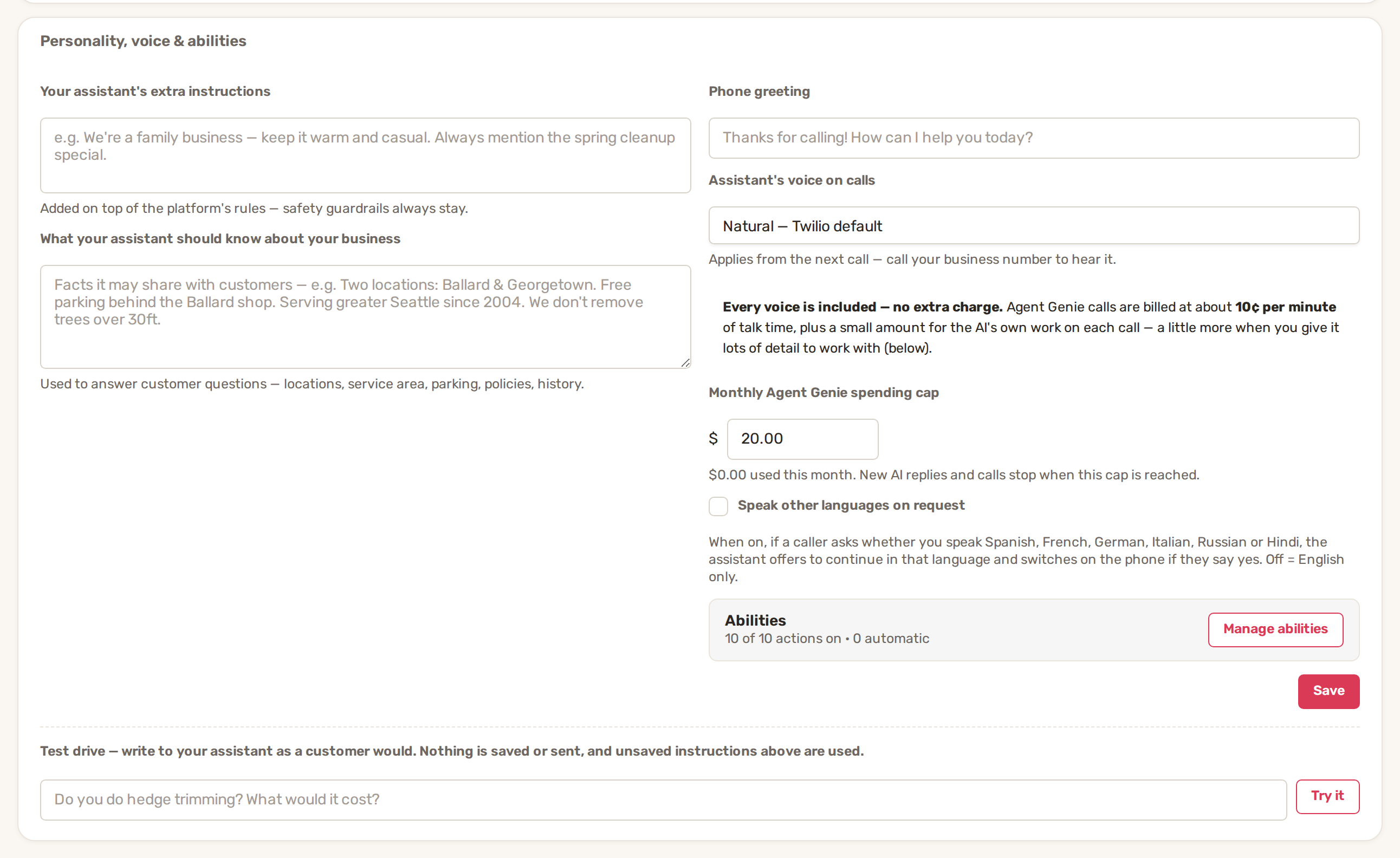
Manage abilities opens the list of things Agent Genie may do, such as booking or rescheduling, and whether each one waits for you. See Agent Genie: approve its replies and choose what it can do.
Type a question into Test drive at the bottom of the card and click Try it. Agent Genie answers as it would to a new customer, using your extra instructions even before you save them. Nothing is saved or sent.
3. Turn it on
- Click Turn on Agent Genie at the top of the page. Without a card on file, BizBaby asks you to add one first.
- Under How your assistant operates, switch on Auto-send confident replies if you want replies it is sure about to go out without waiting for you. Anything it flags, or any action set to ask first, still waits.
- Switch on Answer missed calls if you want it to pick up calls that would otherwise go to voicemail.
To pause it, click Turn off assistant. Your settings stay.
Which calls it answers
Agent Genie is a backup for your team, not a replacement. With Answer missed calls on:
- During working hours, if someone on your team is available in the Call & Message Center, the call rings your team first. It goes to Agent Genie when nobody picks up.
- Outside working hours, it answers straight away.
What happens when nobody picks up is set in Communications → Settings, under Call routing → When nobody picks up. Send the caller to can be Hand to the AI, Send to voicemail or Politely hang up, and Ring for sets how many seconds your team's phones ring first (5 to 120, 25 to start). If Agent Genie is off, "Hand to the AI" sends callers to voicemail. See Call routing, forwarding, greetings and missed calls.
What it says
Agent Genie is told to:
- Keep it short: one to three sentences in a text or chat, one or two on the phone, in plain language.
- Use only your business facts. It never makes up prices, availability or policies.
- Check your calendar before talking about a specific day, and read your services before quoting a price. Bookable services are booked as appointments. Bigger jobs are taken as a job or estimate request, and your team prices them.
- Check your service area early when someone wants work done. If the address is outside it, it declines politely and offers to save their details.
- Before cancelling an appointment or a recurring service, offer to move it first.
- Save the request with the matching action before promising a callback, booking or follow-up, so nothing is promised that your team never hears about.
- Open an issue ticket when a customer reports a problem with your work.
- Never take payments or talk about card numbers.
Privacy. On a call, it discusses appointments and invoices only when the caller's number matches the customer on file. An unknown caller gets public information only, such as hours, services and location. It can take their name, save them as a new customer and book for them.
While you decide. When a text, chat or Contact form reply has to wait for your approval, the customer first gets "Thanks! Let me check this with the team. I'll get back to you shortly." Emails get only the full reply, once it's approved.
Ending calls. After each answer it asks whether there's anything else. When the caller says goodbye, it says one short goodbye and hangs up. Robocalls are flagged and the call ends.
When it hands over to you
Agent Genie stops and leaves the decision to you when a message needs a person: complaints, refunds, custom pricing, or anything it can't answer from your facts. That conversation is marked Needs you, with one sentence on why, and nothing is sent until you act.
On a call it can't stop mid-sentence, so it tells the caller your team will follow up and records it, for example as a to-do or a ticket. After the call you get a summary of what the caller wanted and what was promised, with the full call to read.
To take over a live call yourself, open the Call & Message Center. Calls Agent Genie is on show in Calls in line. Click Jump in and the caller is moved to you. The conversation record then shows what Agent Genie covered before you joined.
For approving replies and actions, see Agent Genie: approve its replies and choose what it can do.
Limits and cost
| Channel | Limit |
|---|---|
| Calls | Up to 10 minutes and 30 back-and-forths per call. 5 AI calls a day from a number that isn't your customer or vendor; after that, that number goes to voicemail for the day. |
| Texts, Contact form | 5 AI replies a day to a sender who isn't your customer. A customer's quick run of texts gets one combined reply. |
| Answered for your existing customers only. | |
| Spending | Everything stops at your monthly cap. |
Calls are billed per minute of talk time (the page shows the current rate, about 10¢ a minute), plus a small amount for the AI's work. Text replies are billed for the AI's work only. Senders and callers you've blocked or marked as spam are never answered, so they cost nothing. See Usage charges and your monthly bill.
Common problems
- "Agent Genie needs a card on file." Add a payment method, then click Turn on Agent Genie again.
- "Your Agent Genie is off, unpaid bill". Your last BizBaby usage payment failed, so Agent Genie stopped answering. It switches back on by itself once the bill is paid.
- The two switches are grey. They work only while Agent Genie is on.
- Answer missed calls isn't on the page. Call answering isn't available on your account yet.
- It stopped replying in the middle of the month. You've reached your monthly spending cap. Raise it under Monthly Agent Genie spending cap and click Save.
- It didn't answer an email. Emails are answered only when the sender is already your customer.
- It didn't pick up a call during working hours. Someone on your team was set as available, so the call rang them first.
- A new caller got voicemail. That number had already had 5 AI calls today, or it is blocked or marked as spam.
Related
- Agent Genie: approve its replies and choose what it can do
- Call routing, forwarding, greetings and missed calls
- The Call & Message Center: calls, texts and chats in one place
- Usage charges and your monthly bill
Was this article useful?
Keep reading
More AI
Agent Genie: approve its replies and choose what it can do
See everything it handled Open Agent Genie in the menu on the left and click the Conversations tab. The badge on the tab...
Read guide →Wingman: your private AI assistant for running the business
Open Wingman Click Wingman in the menu on the left, or the Wingman button in the bottom right corner of any page. The co...
Read guide →Knowing what to charge is step one
First 3 months free. No card required. Bring the whole team.
Start Free Trial Back to Login