Phone and texting
Text messaging registration (A2P 10DLC)
In this article
US carriers only deliver business texts from a registered number. You register on the Get verified to reach customers page in three parts: your Business Profile, your brand ($4) and your campaign ($15). BizBaby sends them to Twilio, our phone carrier, which passes them to the carriers. Until the campaign is approved, BizBaby sends no text messages from your number, so start as soon as you have your business number.
Where to start
Click the gear icon at the top right, then Business Information. On the Business phone number card, click Needs verification or Start verification →. Those links appear once your business has a number. Before that, the card shows Setup Business Phone Number; see Get a new business number.
The same page also opens from the Register link in the tooltip of a locked text automation (🔒 Off on the Automations page) and of a locked Send button on an estimate or invoice. Those links only reach this page once your business has a local number; before that they open the toll-free form.
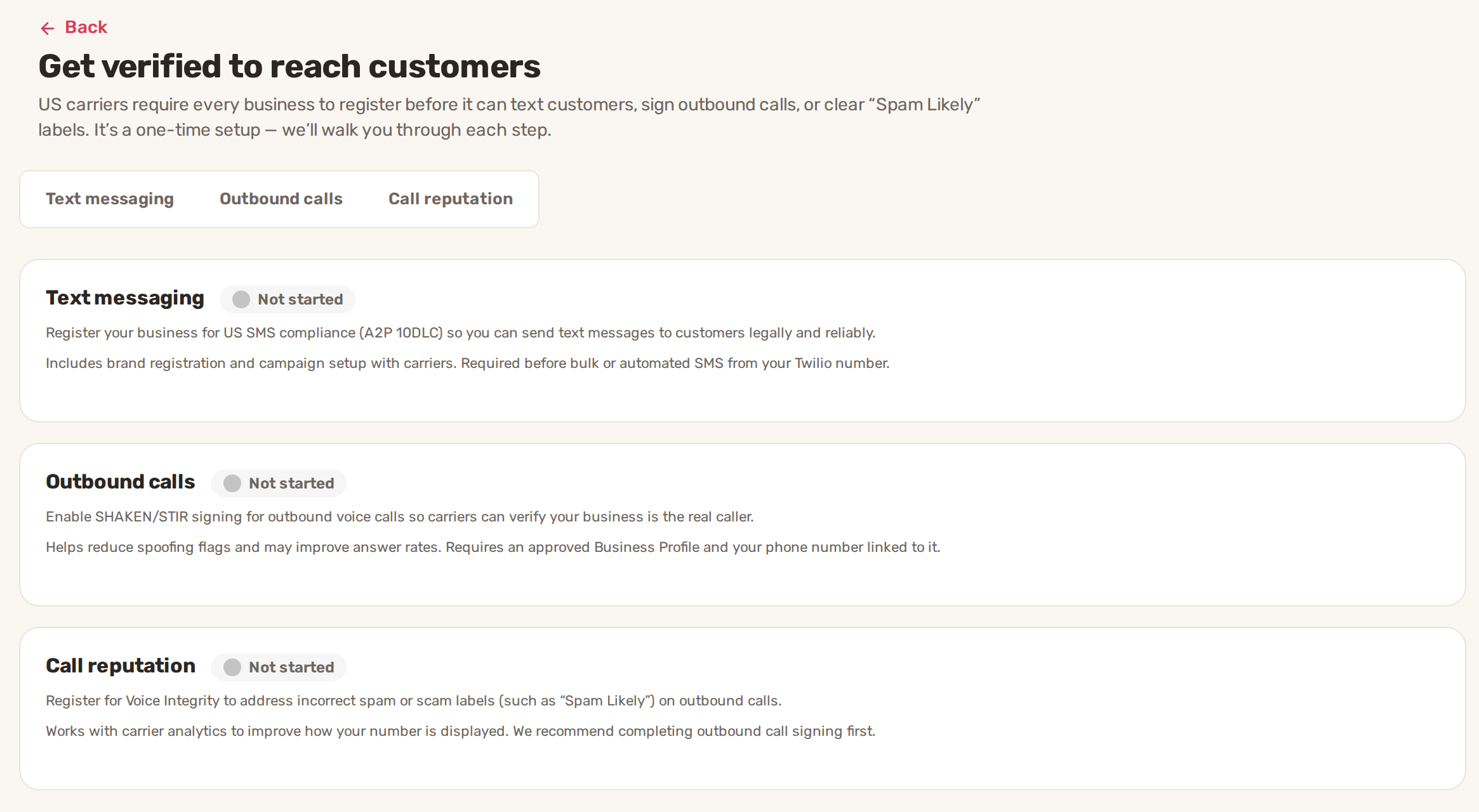
The page has three tabs: Text messaging, Outbound calls and Call reputation. This article covers Text messaging. The other two are optional and explained in Voice verification and call reputation.
| Label | What it means |
|---|---|
| Not started | Nothing has been submitted yet. On the Text messaging card it stays until your brand is submitted, even while the Business Profile is in review. |
| In review | Submitted and waiting for an answer. |
| Approved | Accepted. On the Text messaging card this follows your brand only. Texting starts when the campaign is approved too. |
| Failed | Not accepted. See Why it gets rejected. |
You need admin access to the business to open this page. If your BizBaby number is toll-free, the page opens toll-free verification instead, which is a different form.
The three parts
| Part | What you do | How long the answer takes |
|---|---|---|
| Business Profile | Enter your legal business details and a contact person. | The page checks for the answer every minute while it's open. |
| Brand | Agree to the $4 fee and click Create. | Usually a few minutes. Up to 7 days if it needs a manual review. |
| Campaign | Describe the texts you send and agree to the $15 fee. | From a couple of days to several weeks. |
Each part opens when the one before it is approved. BizBaby emails the person you name under Authorized Representatives each time a review finishes.
1. Fill in your Business Profile
- Click the Text messaging tab. The steps list on the left starts at Profile Requirements.
- Read the requirements and fees, then click Next. The fees table lists One-time Brand Registration at $4 - $44 and a One-time Vetting Fee of $15 per verification, with more fees if a verification is resubmitted after a failure. BizBaby registers businesses with a US tax ID (EIN), so the No answers are greyed out.
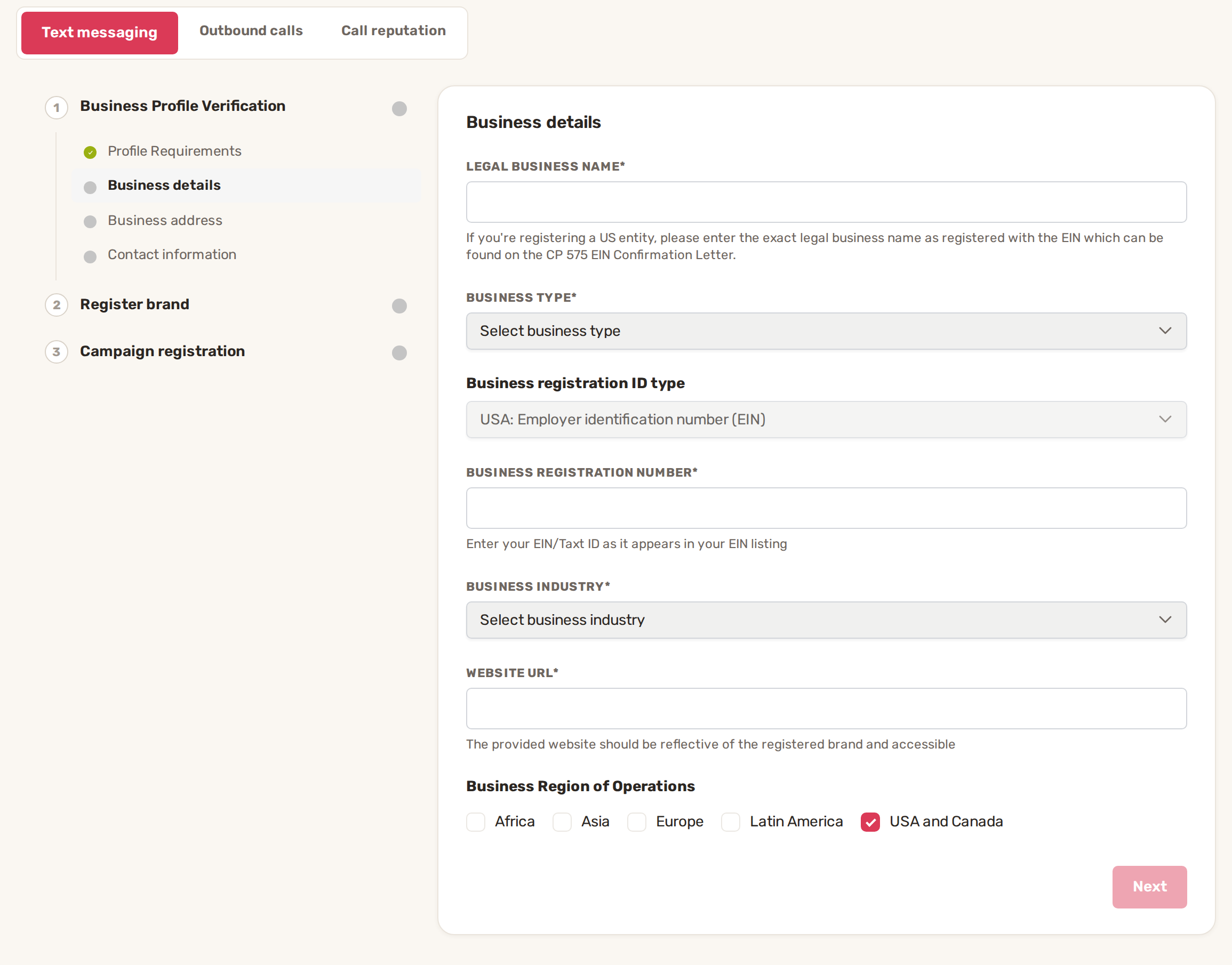
- Fill in Business details and click Next.
- Fill in Business address and click Next.
- Fill in Contact information. The card is titled Authorized Representatives: the person responsible for this registration. BizBaby sends the review results to the email you enter here.
- Tick the declaration under Terms of service and privacy policy and click Submit for review.
| Field | What to enter |
|---|---|
| Legal business name | Your exact legal name as registered with your EIN. It's on your CP 575 EIN Confirmation Letter. |
| Business type | Partnership, Corporation, Co-operative, Limited Liability Corporation or Non-profit Corporation. |
| Registration number | Your EIN as it appears in your EIN listing. The box only takes digits and dashes. |
| Business Industry | The closest match from the list. |
| Website Url | A website that shows this business and opens for anyone. |
| Business address | Street, city and state as they appear in your EIN listing. State is two letters, postal code five digits. |
| Representative | First and last name, email, business title, phone number (123-456-7890 format) and job position. |
2. Submit your brand
BizBaby registers your brand with The Campaign Registry (TCR), which handles it for all carriers.
- Wait for the line next to Create to turn green: The business profile has been verified. You can proceed to the next step.
- Tick I agree the information above is correct and to the one-time $4 A2P brand registration fee.
- Click Create.
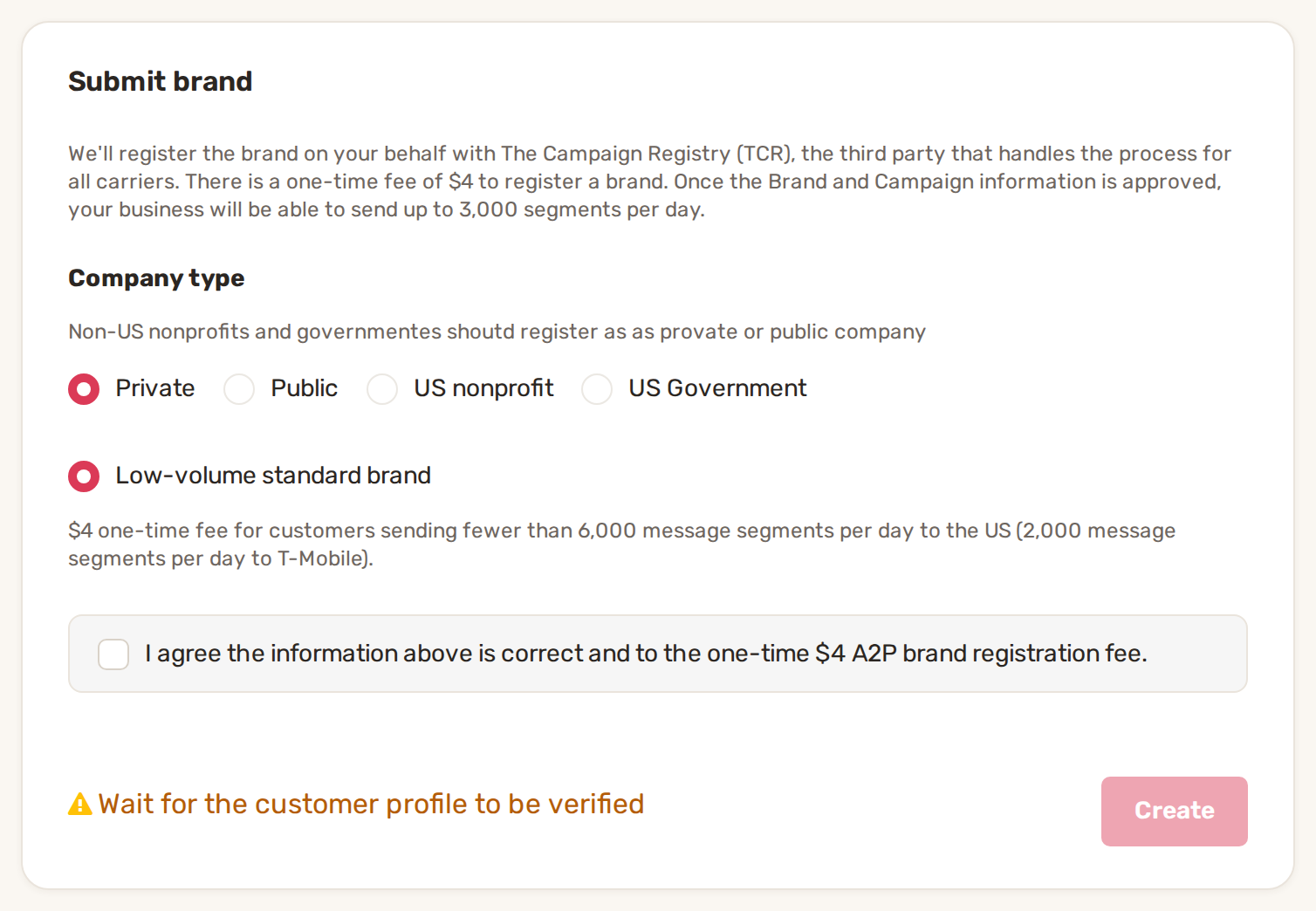
The page then shows A2P brand registration is in progress and refreshes itself when the answer arrives. When it says A2P brand registration is completed, click Next.
3. Register your campaign
The campaign tells carriers what you text customers about. The use case is always Low Volume Mixed. BizBaby fills in the four text boxes with a starting text, and the sample messages use your legal business name. Read each one and change anything that doesn't match the texts you really send.
| Box | Length |
|---|---|
| Campaign description | 40 to 4,096 characters |
| Sample message #1 | 20 to 1,024 characters |
| Sample message #2 | 20 to 1,024 characters |
| How customers consent | 40 to 2,048 characters. The box is labelled How do end-user consent to receive messages? |
- Edit the four boxes.
- Tick I agree the information above is correct and to the one-time $15 A2P campaign registration fee.
- Click Create.
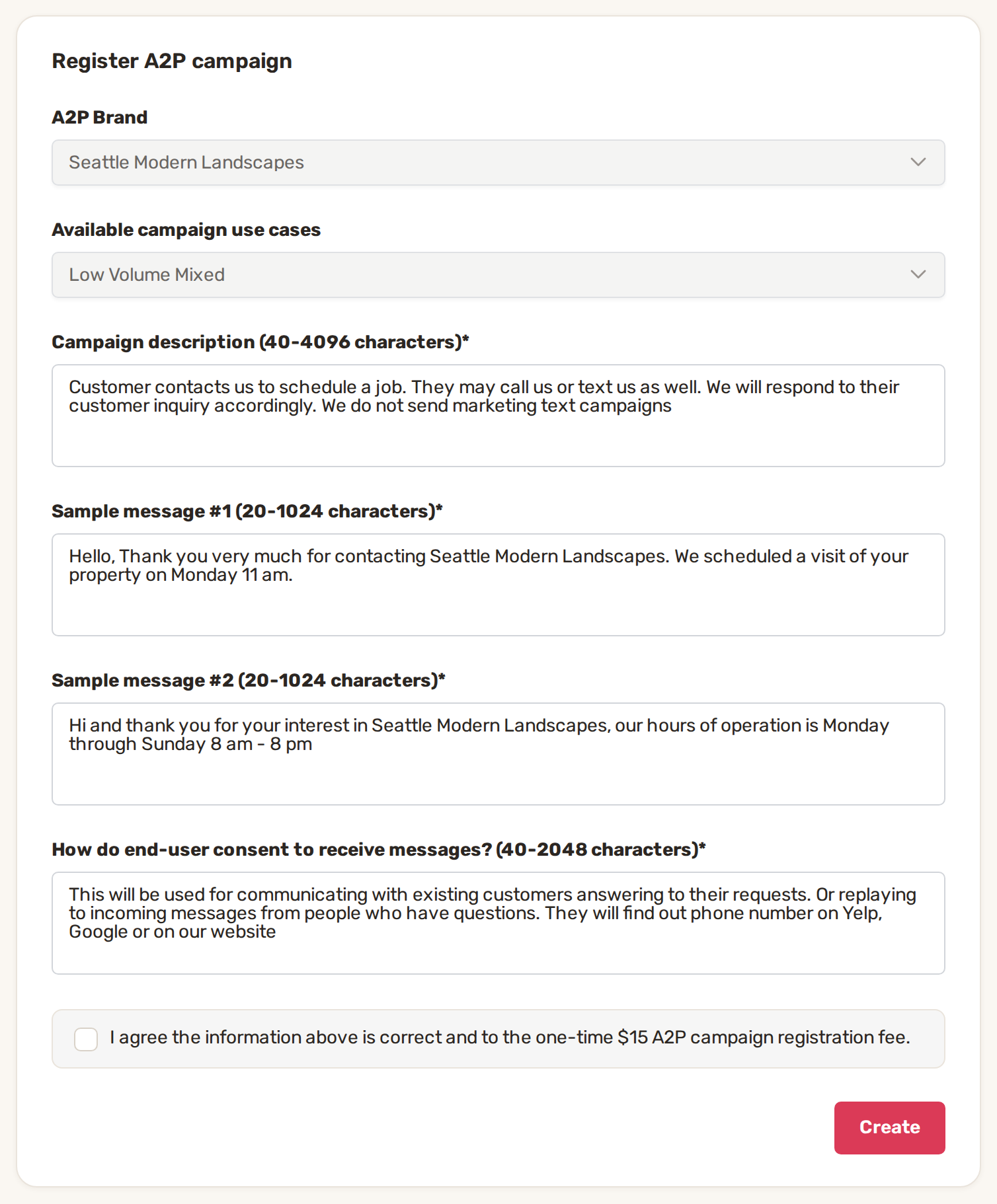
The step Register phone numbers then says the verification takes from a couple of days to several weeks. When it reads A2P campaign has been successfully created, your number is registered., you're done. BizBaby adds your business number to the campaign for you, and text messages and text automations start working.
BizBaby emails your representative when each review finishes, so you can close the page and come back when the email arrives. Your progress is kept.
Why it gets rejected
BizBaby shows the reason it gets back. Here is what each failure looks like and what to do.
| Failure | What the page says | What to do |
|---|---|---|
| Profile rejected | The business profile has not been verified. Try again. | Click Try again. Your answers are still filled in. Check that the name, EIN and address match your EIN paperwork exactly, then submit again. |
| Brand failed | A2P brand registration failed. Check the entered data. For a tax ID mismatch, notes below it say what to change. | Click Check data. Legal business name and Business registration number open, marked red. Use the legal name from your tax filings and your EIN, exactly as filed. |
| No tries left | You have exhausted all verification attempts. | Click Start verification over again. It deletes your Business Profile and brand, and you start again from step 1. |
| Campaign failed | Phone number registration failed and a numbered list of errors from the carriers. | Click Check data. The boxes with a problem are outlined red and open; the rest stay locked. Fix them, tick the $15 agreement again and click Update. |
| Can't reapply | You cannot reapply | The page offers no way to send it again. Contact BizBaby support at support@bizbaby.com. |
Common problems
- Next or Submit for review stays grey. A required field is empty or holds only spaces, or the declaration isn't ticked. The state needs two letters, the postal code five digits and the phone number the 123-456-7890 format.
- Create on Submit brand stays grey. Your Business Profile is still in review. The line next to the button says Wait for the customer profile to be verified.
- The Text messaging card says Approved, but texts don't go out. That label follows your brand. Open the tab and check that the campaign step is finished.
- A text automation shows a lock and Off. Your number isn't registered yet. Finish the campaign, then switch the automation on. See How automations work.
- You clicked Delete on a finished step. Deleting a step revokes it and deletes every step after it. You have to go through them again.
Related
- Voice verification and call reputation
- Toll-free number verification
- Messaging limits and delivery problems
- How automations work
Was this article useful?
Keep reading
More Phone and texting
Call recording
Turn recording on or off Click the gear icon at the top right, then Call & Message Center. Communications → Settings in...
Read guide →Call routing, forwarding, greetings and missed calls
Where to find the settings Click the gear icon at the top right, then Call & Message Center. You can also open it from C...
Read guide →Get a new business number
Before you start You need admin access to the business. Team members without access to business settings can't open the...
Read guide →Knowing what to charge is step one
First 3 months free. No card required. Bring the whole team.
Start Free Trial Back to Login