
Phone and texting
Move (port) your existing number to BizBaby
In this article
Porting moves the phone number you already have from your current phone company to BizBaby, so customers keep calling and texting the same number. You fill in the Porting Number Request form, upload a recent phone bill and sign a letter of authorization. BizBaby files it with Twilio, our phone carrier, which works with your current carrier. It typically takes 2 to 4 weeks. Keep your old phone service running until the move is complete.
Before you start
Have these ready. The details must match what your current carrier has on file, so take them from your latest bill.
- Your latest phone bill as a PDF, dated within the last 30 days and no bigger than 10 MB. It must show the account holder's name, address and the phone number.
- The account holder's name and service address, exactly as they appear on the bill. The address must be a physical location, not a PO Box.
- Your account number with your current provider. It's printed on your phone bill.
- A number transfer PIN if you're moving a mobile number. Ask your mobile carrier for it if you don't have one.
- The email of the person who signs the authorization: the account holder.
BizBaby can move numbers from the continental United States only.
1. Open the request form
The form has no menu item. Ask BizBaby support to move your number, and we email you BizBaby - New Phone Number Port Request with a link to the Porting Number Request form. Open it while you're signed in to your business.
2. Read and accept the terms
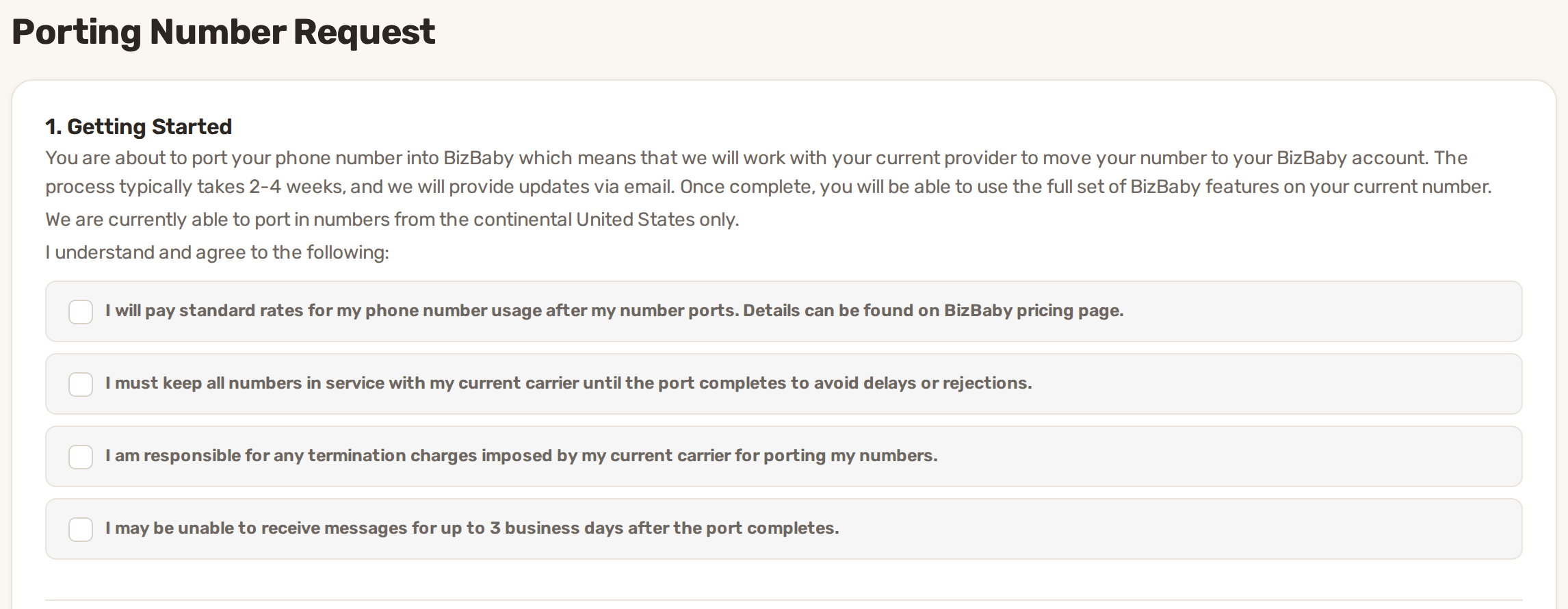
Under 1. Getting Started, tick all four boxes. You can't submit until they're all ticked.
3. Fill in the basic information
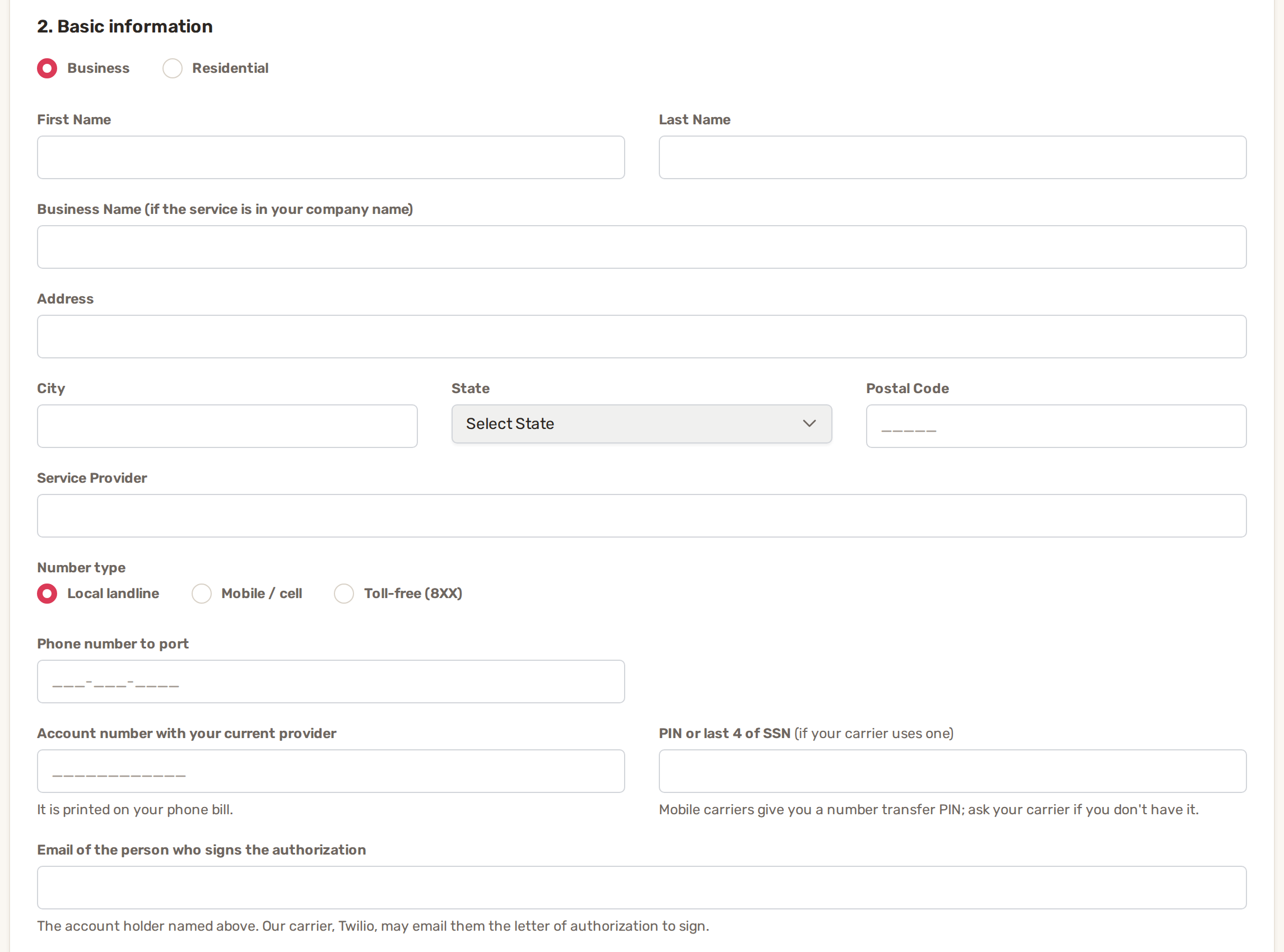
| Field | What to enter |
|---|---|
| Business or Residential | How the phone account is set up with your carrier. Residential hides the business name. |
| First and Last Name | The account holder, exactly as on the bill. |
| Business Name | Only for Business, and required there: the company name on the phone account. |
| Address | Address, City, State and Postal Code of the service address your carrier has on file. |
| Service Provider | Your current phone company. |
| Number type | Local landline, Mobile / cell or Toll-free (8XX). |
| Phone number to port | The 10-digit number you're moving. |
| Account number | Account number with your current provider, from your bill. |
| PIN or last 4 of SSN | Required for mobile numbers. For other numbers, only if your carrier uses one. |
| Signer's email | Email of the person who signs the authorization. Twilio may email this person a letter of authorization to sign. |
4. Upload your bill and sign
- Under 3. Document, click Upload File and choose your phone bill PDF.
- Click Submit. If something is missing, the field turns red. Otherwise the Confirmation Signature window opens.
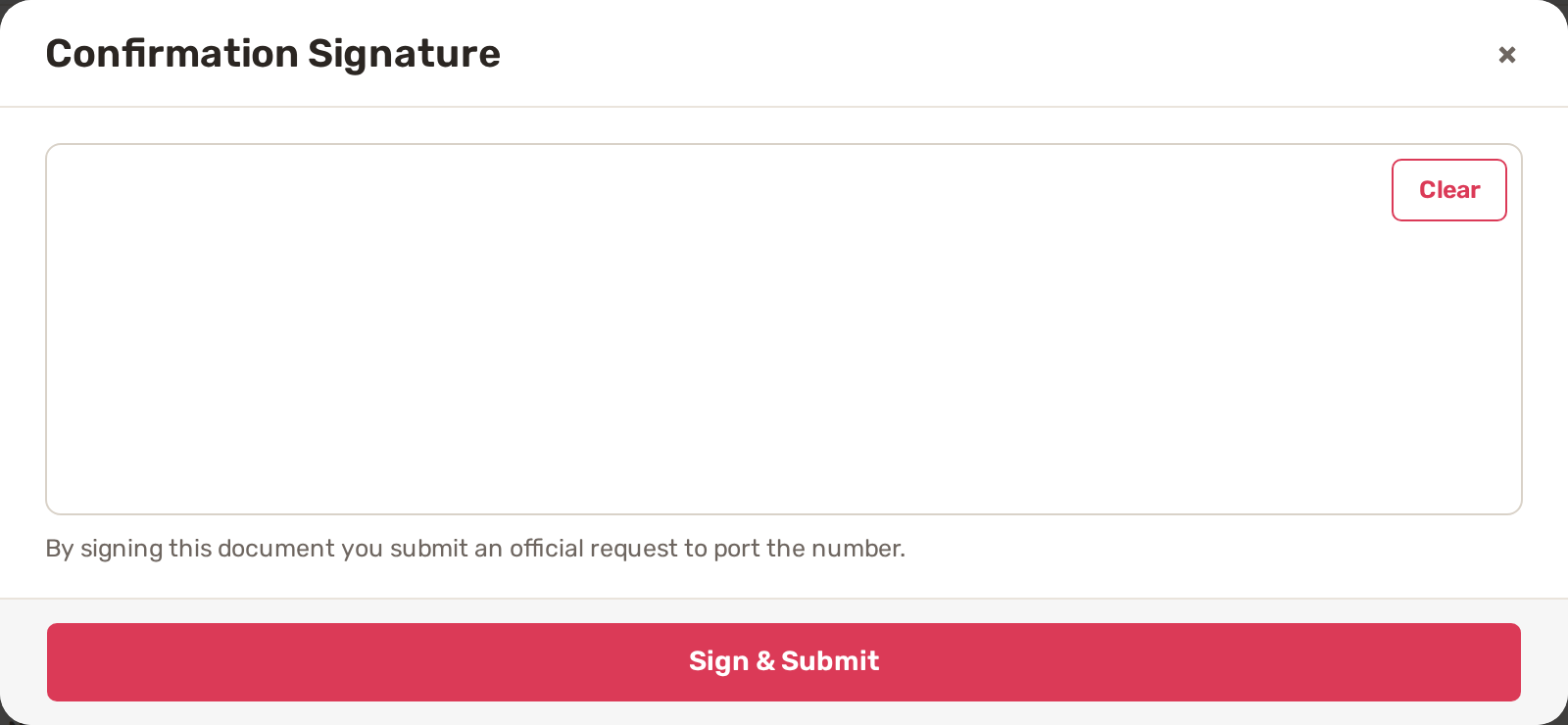
- Sign in the box with your mouse or finger. Clear starts the signature again.
- Click Sign & Submit.
The letter of authorization (LOA)
BizBaby turns your answers and signature into a Porting Letter of Authorization: the signed permission for the move. It lists the account holder's name, the business name, the service address, the number and your current provider, with your signature, printed name and the date.
By signing it you confirm that you are the account holder, or represent the business that is, that you're at least 18, and that the name and address match your carrier's records. It authorizes Biz Baby Inc. to ask your carrier to move the number and to get the account information needed for the move.
Twilio may also email the signer its own letter of authorization to sign online. Sign it within 30 days. After that the request expires and has to be submitted again.
Follow the request
Open the form link again any time. Instead of the form, it shows The status of your number porting request. BizBaby also emails your business email address as the status changes.
| Status | What it means |
|---|---|
| In Review | The request is received and Twilio is reviewing it. |
| Waiting for Signature | Twilio emailed the letter of authorization to the signer. Sign it within 30 days. |
| In Progress | Twilio is working with your current carrier to move the number. |
| Completed | The number is yours in BizBaby. |
| Who | Does what |
|---|---|
| You | Fill in and sign the form, sign Twilio's email if one comes, keep your old service running, and fix the request if it's rejected. |
| BizBaby | Sends you the form, files the request with Twilio, follows it with your carrier, and switches your business to the number when it arrives. Toll-free numbers are always filed by BizBaby staff by hand. |
When the move is complete
You get the email Your phone number has moved to BizBaby. You can call from the number straight away. Texting starts once the number's text messaging registration is approved, so register it next: Text messaging registration (A2P 10DLC).
If you already had a BizBaby number, it keeps reaching you until BizBaby releases it.
Why a request gets rejected or stopped
| What happened | What you see | What to do |
|---|---|---|
| Can't be ported | This number can't be ported: followed by the reason. | The number can't move to BizBaby. Contact support to talk about options. |
| PIN needed | This number's carrier requires the account number and the transfer PIN. | Get the transfer PIN from your carrier, enter it and submit again. |
| Carrier rejected it | The email Phone Number Port Request was Rejected, and the form opens again with your answers. | Check the name, address, account number and PIN against your bill, correct them, then submit and sign again. The number itself can't be changed here. |
| Not signed in time | The email Phone Number Port Request was Canceled. | Twilio's letter wasn't signed within 30 days. Open the form and submit a new request. |
Common problems
- "Enter the 10-digit US number to port". Type the full number, area code first.
- "This is a toll-free number: choose Toll-free." Numbers starting with 800, 833, 844, 855, 866, 877 or 888 are toll-free. Pick Toll-free (8XX).
- "Mobile carriers require the number transfer PIN". With Mobile / cell selected, the PIN box is required.
- "Upload the billing statement as a PDF." Photos and Word files aren't accepted. Save or scan the bill as a PDF of 10 MB or less.
- The signature window says the signature is too short or empty. Sign in the box before clicking Sign & Submit.
- The status stays at In Progress for weeks. A move typically takes 2 to 4 weeks, and BizBaby emails you when the status changes. Contact support if it's taking longer than that.
Related
- Get a new number
- Text messaging registration (A2P 10DLC)
- Toll-free number verification
- The Call & Message Center
Was this article useful?
Keep reading
More Phone and texting
Call recording
Turn recording on or off Click the gear icon at the top right, then Call & Message Center. Communications → Settings in...
Read guide →Call routing, forwarding, greetings and missed calls
Where to find the settings Click the gear icon at the top right, then Call & Message Center. You can also open it from C...
Read guide →Get a new business number
Before you start You need admin access to the business. Team members without access to business settings can't open the...
Read guide →Knowing what to charge is step one
First 3 months free. No card required. Bring the whole team.
Start Free Trial Back to Login